Add a Quality Gate to Your Agency Workflow
I ghostwrote for agencies for most of 2025. I watched the same mistake happen at three different shops: a client catches a real error in a piece we'd all signed off on, and the relationship changes.
Not dramatically. Not with a confrontation. Just a shift. The email is a little more formal. The next retainer conversation has more friction. The agency that was "easy to work with" is now "the one that shipped us a piece with a fake statistic."
Most agencies run a human-only quality step: writer submits, editor reviews, client receives. Three rounds of human attention on every piece. And still, things slip through. A fabricated number that sounds credible. A paragraph that overlaps too closely with an existing article. A health claim that puts the client in regulatory exposure.
I'd been the one signing off. Three reviewers missed a made-up statistic that a first-year editor would have caught on a better day. Human attention isn't systematic. It doesn't run the same checks every time. It gets tired. It reads for flow, not for whether the statistic in paragraph three has a traceable source.
So I built the systematic step that fires the same checks every time. Here's where it belongs in your pipeline, and what it actually catches.
Where the gate goes in your pipeline
A typical agency pipeline looks like this:
Brief → Writer → Draft → Editor → Client delivery
The quality gate slots in at one of two places: between writer and editor, or between editor and client delivery.
The first position is faster. The editor runs the check as the first step of their review. If the report flags a fabricated statistic or a plagiarized passage, the editor sends it back to the writer with the specific finding attached. No time wasted on a full edit pass for a draft that needs factual repair.
The second position is a final safety net. The editor has already done their work. Running the check before the client sees it is a 30-second catch for anything that slipped through.
Either way, the editor runs it. Not the writer. The writer focuses on the draft. The editor owns the gate.
At 30 seconds per article, this doesn't add meaningful time to the process. What it adds is a consistent, evidence-backed audit that runs the same 12 checks on every piece — whether the editor is fresh on Monday morning or tired on Friday afternoon.
What the gate actually catches
Fabricated statistics. Writers often include numbers that "sound right" — "73% of buyers prefer video content," "the average person checks their phone 96 times a day." Some of these are real. Some are hallucinations. Some are real studies that have been misquoted for years. CheckApp's fact-check skill extracts every factual claim, queries a real-time search provider for sources, and returns verdicts with actual URLs. Not LLM memory — retrieved evidence.
Near-plagiarism. Paraphrasing doesn't always clear the bar. A reshuffled sentence that keeps the same structure and three consecutive words is close enough to flag under most plagiarism standards. Copyscape and Originality.ai find these at the passage level, not just exact matches.
Health and legal risk. Wellness content and health-adjacent SaaS content are the highest-risk categories. "Clinically proven to reduce inflammation" is an FDA violation if the study doesn't back it. "Guaranteed to improve your credit score" is a false promise. "This supplement eliminates anxiety" is a defamation magnet if the product doesn't work. The legal skill scans for these patterns before they reach the client — before the client's legal team finds them.
Brand voice drift. On long-running retainers with multiple writers, voice consistency erodes. The tone skill compares the article against a brand voice guide you upload once. It flags when the piece is drifting toward overly casual, overly formal, or off-brand phrasing.
Incomplete brief coverage. A writer who skips a required section — the comparison table, the FAQ, the product-specific use case — may have read the brief but simply ran out of time. The brief-matching skill verifies the article covers what the brief required.
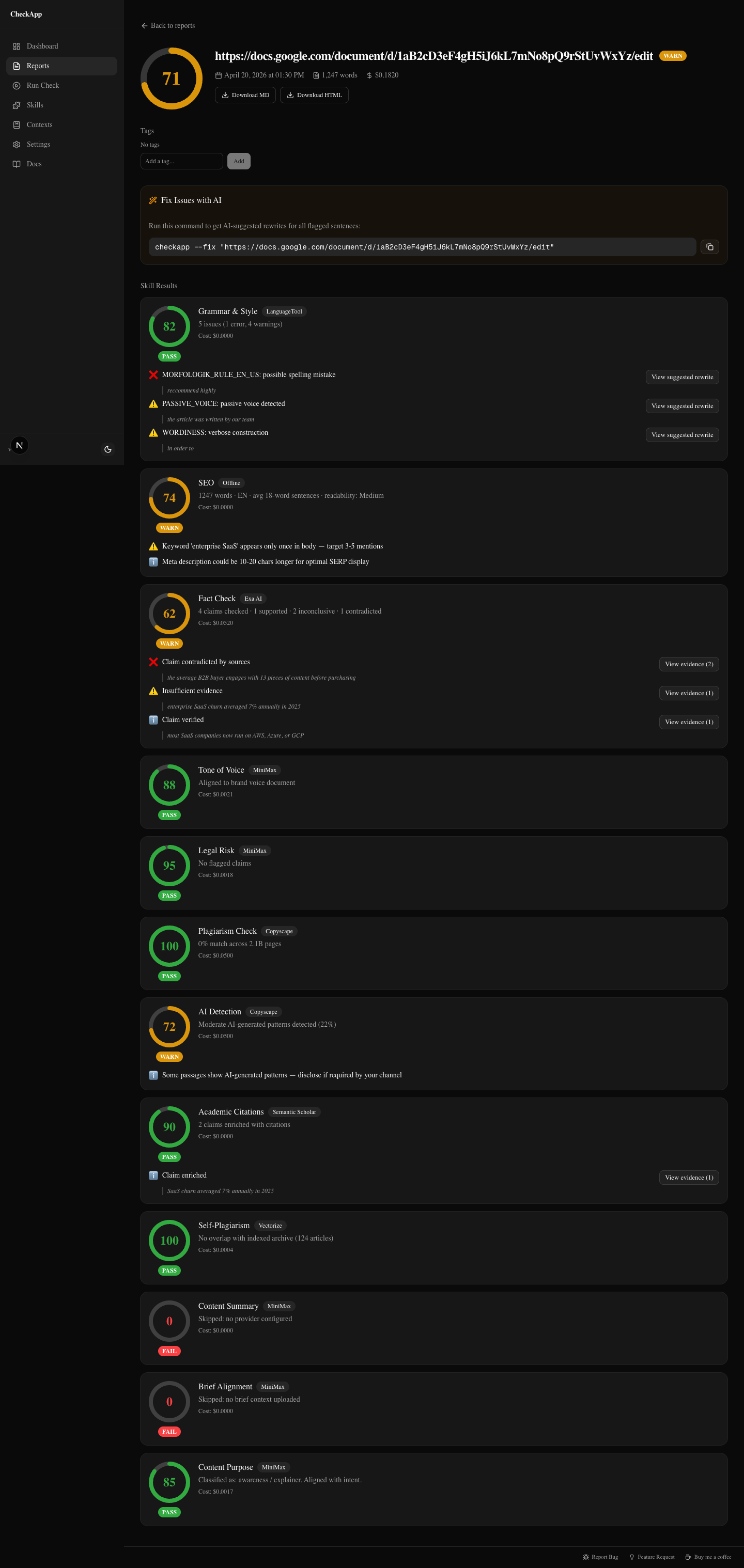
That's a wellness article with three issues: a fact-check claim that contradicts the retrieved sources, a legal finding flagging FDA-risk phrasing, and a grammar warning. Each finding has evidence attached. The editor decides what to do with it — but the findings don't slip through unchecked.
The editor's checklist
When the editor opens the CheckApp dashboard and runs a check, the workflow is:
1. Look at the top-level verdicts first. Each skill returns a status: pass, warn, or fail. A full pass on all 12 skills takes under 10 seconds to confirm. The editor is looking for any fail or warn before reading the full report.
2. Drill into any FAIL. Fails typically come from legal risk or fact-check. These are not judgment calls — they're evidence-backed findings that require resolution before the piece ships. The report shows the specific claim, the retrieved source, and the verdict. The editor either sends it back to the writer with the finding attached, or fixes it directly.
3. Review WARN findings. Warns are mostly subjective. A grammar warning might be intentional stylistic choice. A tone warning might reflect a brand guide that needs updating, not a writer error. The editor makes the call. Most warns don't require a rewrite — they require a decision.
4. Ship or return. If all fails are resolved and warns are assessed, the piece goes to the client. If not, it goes back to the writer with the CheckApp report attached. The writer can see exactly what flagged and why — no vague "please fact-check your sources" feedback.
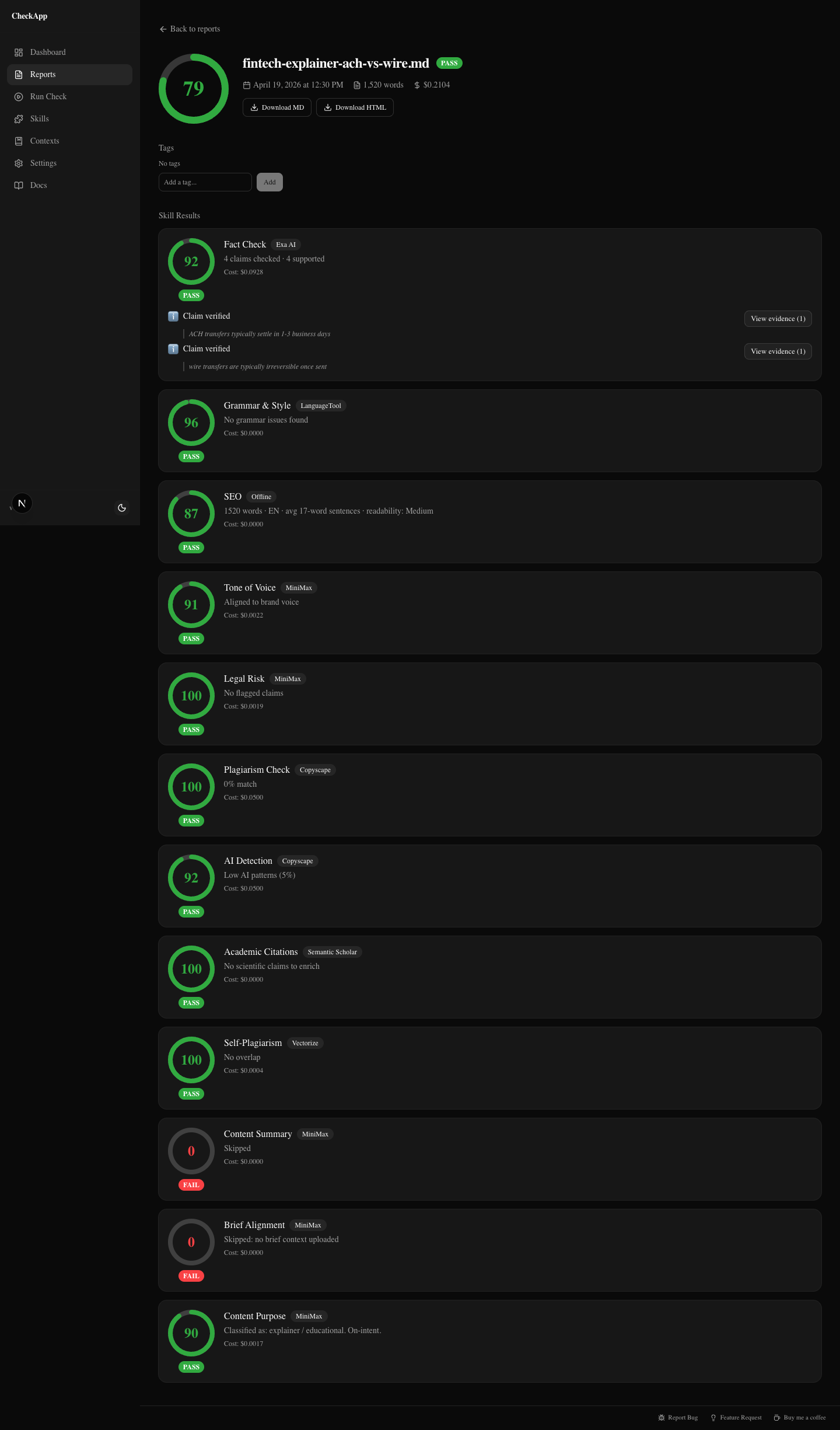
That's a fintech explainer with a 79/100 score. Twelve skills checked. Most pass. The editor can see at a glance what's clean and what needs attention. This is what "good" looks like in the report — most cards green, a few warnings to review.
Who does what on a 3-person team
The writer doesn't interact with CheckApp at all. The writer's job is the draft. Adding a QA step to the writer's process creates friction and shifts accountability in the wrong direction. The writer is not responsible for running the gate. The editor is.
The editor runs CheckApp after their first pass. They use the output to decide: does this need to go back to the writer, or can I resolve these findings myself? The report becomes part of the editing workflow, not an additional task on top of it.
The head of content sees the quality trend over time. CheckApp keeps a searchable history of every check: score, skill verdicts, article metadata. Over three months, patterns emerge. One writer consistently drifts on tone. Another frequently misses brief coverage. A specific content category reliably produces fact-check warnings because the briefing process doesn't include a sources requirement.
That's coaching data. Not "your writing isn't consistent" — "your last eight fintech pieces flagged brand voice drift in the second half. Here's what the tone guide says about that register."
The history view also gives the head of content a reportable quality metric for clients. Not "we reviewed it carefully" — a score, a pass rate, a trend line.
What a 10-article/month agency saves
The math on CheckApp is almost embarrassingly small. Ten articles at roughly $0.15 per check — that's $1.50 a month. With free-tier providers (LanguageTool for grammar, Semantic Scholar for academic citations, the offline SEO skill), most of the skill set runs at zero cost — you only pay per fact-check query.
The cost isn't the point. The point is what a single slipped fact costs.
One fabricated statistic in a piece for a financial services client doesn't just require a correction. It requires a conversation about your review process. It puts the retainer in question. It's the piece that gets screenshotted and forwarded to someone senior at the client.
$1.50 a month is not a meaningful budget line. The credibility of your editorial process is.
Getting started
Install CheckApp, run the setup wizard to configure providers, and point your editors at the dashboard.
npm install -g checkapp
checkapp --setup
checkapp --ui
The dashboard opens at localhost:3000. For fact-checking, configure Exa Search ($0.007/claim), Exa Deep Reasoning ($0.025/claim), or Parallel Task — those are the three fact-check providers the skill actually runs. For plagiarism, you'll need a Copyscape or Originality.ai key. For legal and tone checks, any LLM key works — Claude, OpenAI, or MiniMax.
If you want to add it to a CI pipeline or run checks headless across a batch of files, the CLI handles that too: checkapp article.md --ci exits nonzero on fail. One mention because it's there — but for most agency editors, the dashboard is the right interface.
No beta gate. No waitlist. MIT license. The repo is at github.com/sharonds/checkapp.
Run your next article through it before it goes to the client.
Was this useful?
Share it with someone who ships AI content.
Continue reading
I Ran 5 Client Articles Through CheckApp — Here's What It Caught
Five real client articles — fintech, wellness, SaaS, B2B, onboarding. A contradicted statistic, FDA-risk phrases, a plagiarism near-miss, and self-plagiarism the writer didn't know about.
CheckApp vs Grammarly vs ChatGPT vs Copyscape
An honest comparison of four content quality tools across grammar, plagiarism, fact-checking, AI detection, tone matching, and legal risk — for agencies, marketers, and writers.
Try CheckApp
Open source. MIT. ~$0.15/check (estimate). Install in 60 seconds.