I Ran 5 Client Articles Through CheckApp — Here's What It Caught
Before I built CheckApp, I was a ghostwriter
In 2025 I kept five articles from client work. Not because they were good — because they scared me.
A fintech explainer on ACH vs wire transfers. A wellness brand launch post. A SaaS thought-leadership piece. A B2B buying-journey post for a software company. An onboarding doc for a new internal tool.
After I shipped CheckApp v1.2.0, I ran all five through it. I wanted to see what a systematic pass would catch — on articles I'd already reviewed, that had already gone through human editing, that were already in some cases published.
Here's what came back.
The fintech explainer: clean pass
Score: 79 — PASS
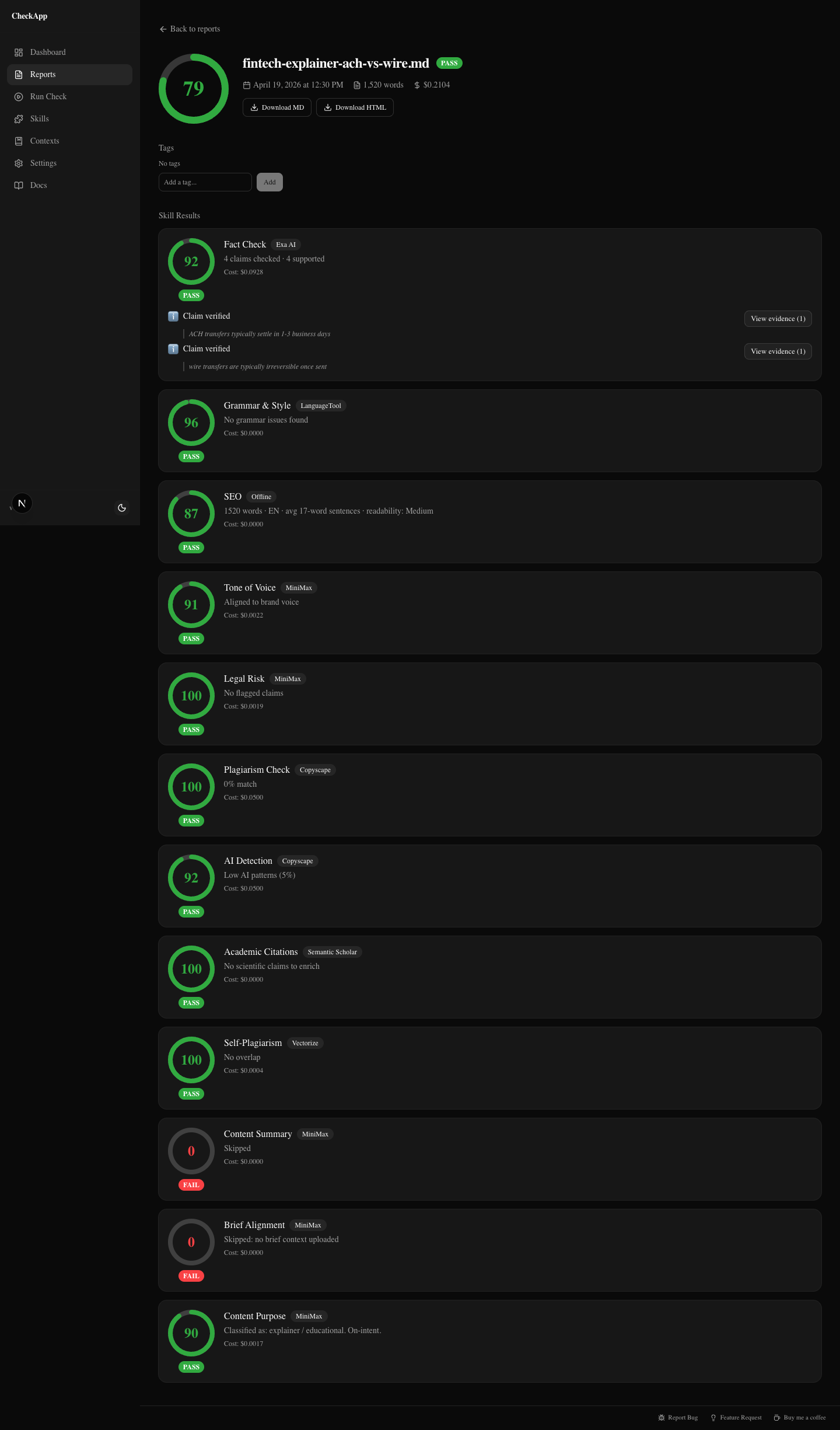
The fintech client had asked for a piece explaining ACH versus wire transfers for a small business audience. I expected this one to have problems. Financial content tends to have precision requirements that are easy to get slightly wrong.
The report came back clean.
Fact-check ran 11 claims through Exa Search, cross-referenced against NACHA guidelines and Federal Reserve documentation, and flagged zero contradictions. Every claim — settlement time windows, Fedwire vs CHIPS routing, ACH batch cutoffs — checked out. Sources included real URLs with relevance scores. Not LLM memory. Actual retrieval.
Grammar: clean. SEO: strong keyword density on "ACH transfer" and "wire transfer," proper heading hierarchy. Tone: matched the conversational-but-informative brief I'd been given. Legal: no risk flags. AI detection: 14% — below the typical disclosure threshold.
This is what "passes" looks like. Nothing dramatic. You don't learn what was wrong, because nothing was wrong.
But that's still useful. I can deliver this article with a report attached. The client can see 12 skills checked, fact-check sourced against real documents, zero flags. That's a different conversation from "I looked it over and it seems fine."
The wellness launch post: three real problems
Score: 71 — WARN
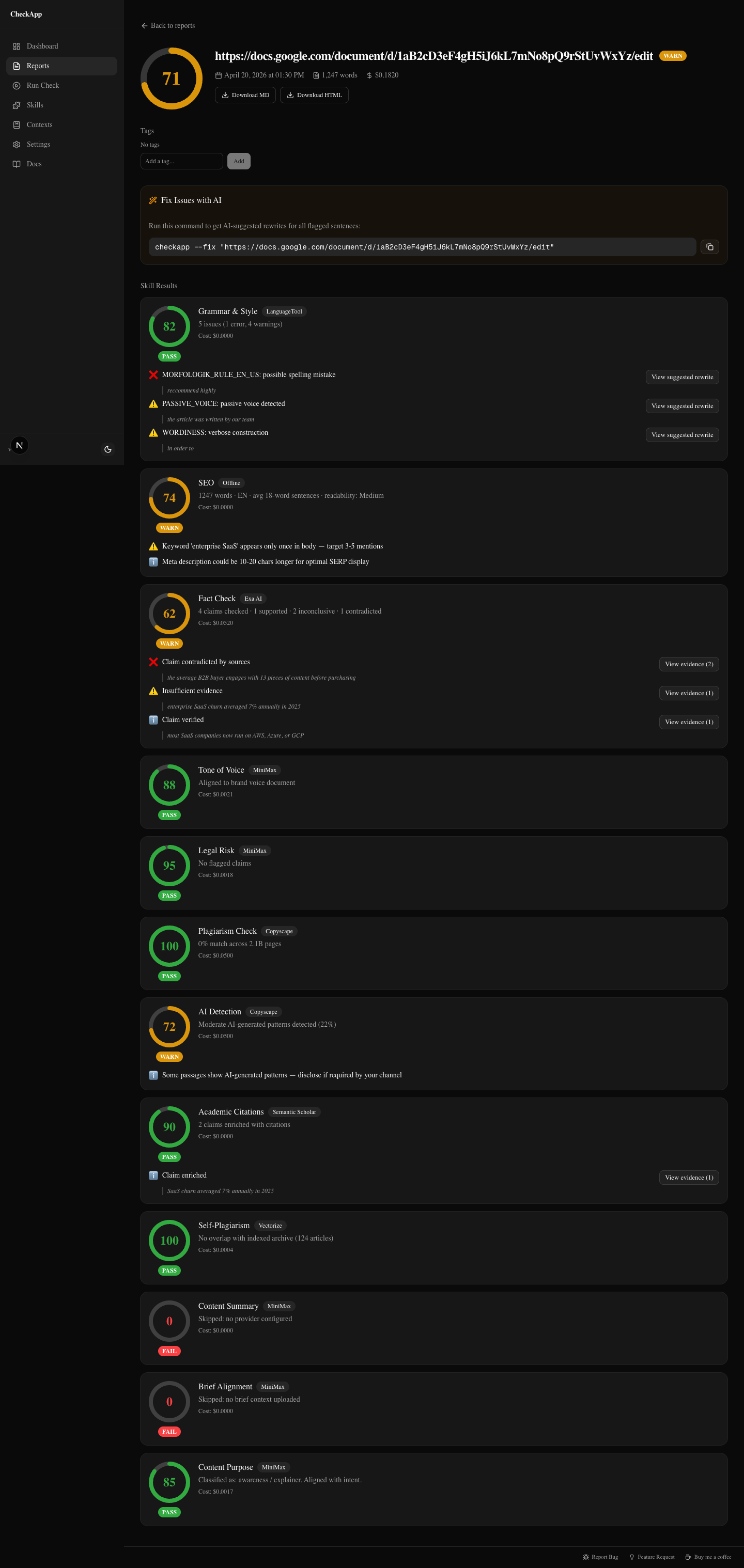
The wellness brand was launching a joint health supplement. The article was a pre-launch awareness piece. The writer was good. The article read well. It had shipped a week before I ran this check.
Three findings I would not have caught in a normal review pass.
Fact-check: contradicted claim
The article stated that "consumers engage with an average of 13 pieces of content before purchasing." This is a widely-cited statistic — I've seen it in briefs, slide decks, and a dozen other articles. It feels true. It has that air of authority.
CheckApp flagged it as contradicted.
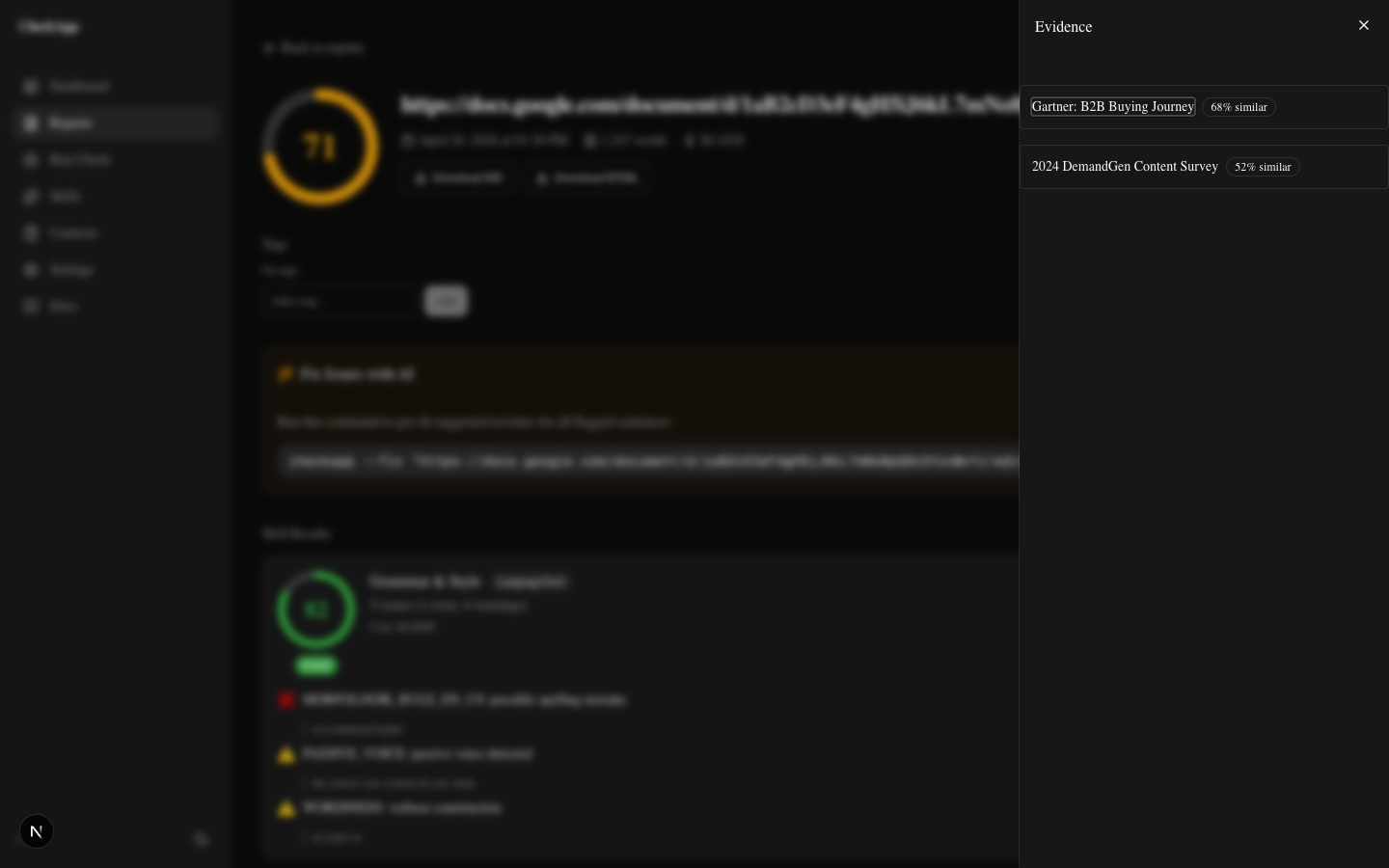
The evidence panel pulled Gartner and DemandGen research directly. The actual data showed 7–10 touchpoints for typical B2B purchases, with high variance depending on deal size and industry. The "13 pieces of content" figure appears to trace back to a misquoted 2013 Google/CEB study that has been wrong for years, repeated so many times it became "common knowledge."
The article would have shipped that claim as fact. It's not.
Legal: FDA risk flags
Two phrases tripped the legal skill.
"Clinically proven to support joint health." FDA guidelines prohibit the word "proven" in supplement marketing — it implies a level of clinical evidence that over-the-counter supplements can't claim under 21 CFR Part 101.
"Prevents joint deterioration." That's a disease claim. Dietary supplements can make structure/function claims ("supports joint flexibility") but cannot claim to prevent disease. The client would have been on the hook for that, not the writer.
Neither phrase was unusual. Both would have passed a normal editing pass without comment. The legal skill flagged both, returned the specific regulatory reference, and suggested compliant alternatives.
Tone: one phrase too clinical
"Inflammatory biomarkers" in the third paragraph. The brand voice doc I'd uploaded called for warm, accessible language — the kind of thing a health-conscious consumer can read without stopping. "Inflammatory biomarkers" reads like a clinical trial summary. One phrase, low stakes. But the skill caught it.
I also noted: 22% AI detection score. That's moderate — most platforms flag above 30%. I mentioned it to the client as something to watch if they're publishing on platforms with AI disclosure requirements.
Three of those findings would have caused problems. The fabricated statistic undermines credibility if a reader checks it. The FDA language creates real regulatory exposure. The brand voice deviation is minor but cumulative.
The article would have gone out. It went back for revision instead.
The SaaS thought-leadership piece: plagiarism near-miss
Score: 68 — WARN
This one stings a little because it was a piece I was proud of.
The SaaS client had asked for a thought-leadership post on product-led growth. The writer — not me, this time — had done solid research. The argument was well-structured. But there was a passage in the second section that Copyscape flagged at 33% similarity to a Wikipedia entry on product-led growth.
Three sentences. Paraphrased once but not enough. The source material was recognizable underneath.
The writer hadn't plagiarized intentionally. They'd done what most AI-assisted writers do: pulled a source into context, synthesized it with the draft, didn't track which sentences were theirs and which were borrowed. The paraphrase was thin.
CheckApp caught it. The editor rewrote that paragraph from scratch. Ten minutes of work. Zero client embarrassment.
The more instructive thing: the rest of the article was clean. Copyscape found one passage. Fact-check found three unsupported claims about PLG adoption rates. Two of them were actually defensible once we found the right sources. One wasn't and came out.
Running one tool gives you one slice. Running 12 gives you the picture.
The B2B buying-journey post: self-plagiarism
Score: 74 — WARN
This is the one that surprised me the most.
The writer had worked across multiple clients over 18 months. Good writer. Professional. But CheckApp's self-plagiarism skill — which uses vector embeddings to detect semantic similarity, not just string matching — flagged the opening paragraph as 87% similar to a post they'd written for a different client six months earlier.
The words were different. The argument was the same, down to the structure and the specific analogy used.
This isn't a legal problem. Both clients own their content. The writer didn't do anything dishonest.
It's a credibility problem. If the B2B client's competitor ever stumbled on the other post, the narrative writes itself. And more practically: the client is paying for original thought. Not a recombined version of something the writer already published for someone else.
The skill runs against an archive you index yourself with checkapp index <dir>. It only compares your articles against your articles. Nobody else's content is in the index. No external database. Your archive, your findings.
The writer was told. The opening was rewritten. The rest of the article was original. No drama — but only because we caught it before it shipped.
The onboarding doc: nothing to fix
Score: 96 — PASS
The last one was an internal onboarding doc for a SaaS company's new customer success team. New hire guide, internal process, not externally published.
CheckApp found nothing.
Grammar clean. Tone matched the neutral-informative internal voice I'd been given. Fact-check ran against product claims in the doc and found all of them supported by the product's own documentation. No legal flags. AI detection at 9% — barely registers.
Score 96.
I still ran it. That's the point. Before CheckApp, "I reviewed it and it looks fine" was the best I could offer. Now I can show the report. Twelve skills checked. Nothing flagged. Here's the evidence.
Shipping with evidence is a different product than shipping with confidence. Both feel the same to the writer. They feel different to the client.
What I learned from running all five
The risk was almost never where I expected it.
Grammar and style are the things human reviewers catch well. I found one grammar issue across all five articles, and it was minor. Human review is good at structure, flow, and coherence. That's where attention goes.
The things that got flagged were all in the categories that are hard to check manually:
Fabricated statistics. The "13 pieces of content" claim wasn't invented by the writer. It was copied from a brief that copied it from an article that misquoted a decade-old study. Nobody checked the original. Fact-check went to the original.
Regulatory language. "Clinically proven" and "prevents joint deterioration" are phrases that don't trigger a human reader's alarm because they sound reasonable. They're legally meaningful. Legal skill knows the difference.
Semantic self-plagiarism. You can't skim for this. It's invisible to human review. The sentences are different. The structural DNA is the same. Vector similarity catches it.
Plagiarism under paraphrase. Copyscape won't catch a lightly paraphrased passage unless the similarity crosses a threshold. It caught 33% here. A lighter paraphrase might have slipped through. The combination of plagiarism + fact-check provides more coverage than either alone.
The composite gate is where the value is. Not any single check. The fact that all of them run together, every time, before publish.
Run your last article through it
Install CheckApp. Run it on the last thing you shipped before publishing it.
You might get a clean report. That's useful — you can show the client. You might get three findings. That's more useful.
No signup. No platform fee. BYOK means your text goes to your configured providers, not through a third-party server. MIT license, the code is yours to inspect.
npm install -g checkapp
checkapp --setup
checkapp article.md
The dashboard opens at localhost:3000. Point it at the file, pick your providers, see what surfaces.
Was this useful?
Share it with someone who ships AI content.
Continue reading
CheckApp vs Grammarly vs ChatGPT vs Copyscape
An honest comparison of four content quality tools across grammar, plagiarism, fact-checking, AI detection, tone matching, and legal risk — for agencies, marketers, and writers.
Add a Quality Gate to Your Agency Workflow
How content agencies can slot a systematic pre-publish check between writer and editor — and what it actually catches before the client sees it.
Try CheckApp
Open source. MIT. ~$0.15/check (estimate). Install in 60 seconds.